
Bahon Boi app icon: a car above an open book
Bahon BoiVehicle accounts app · Android

Every vehicle’s accounts, in one book.

See what each vehicle really earned, what drivers still owe, what you spent and what profit is left — on your phone, in Bengali or English, without internet.

For owners of buses, private cars, CNGs, auto-rickshaws, trucks, pickups and other vehicles, and for small transport businesses in Bangladesh.

Google Play — coming soon How to use it

Coming soon Not yet published in any store. The download link will be added here.

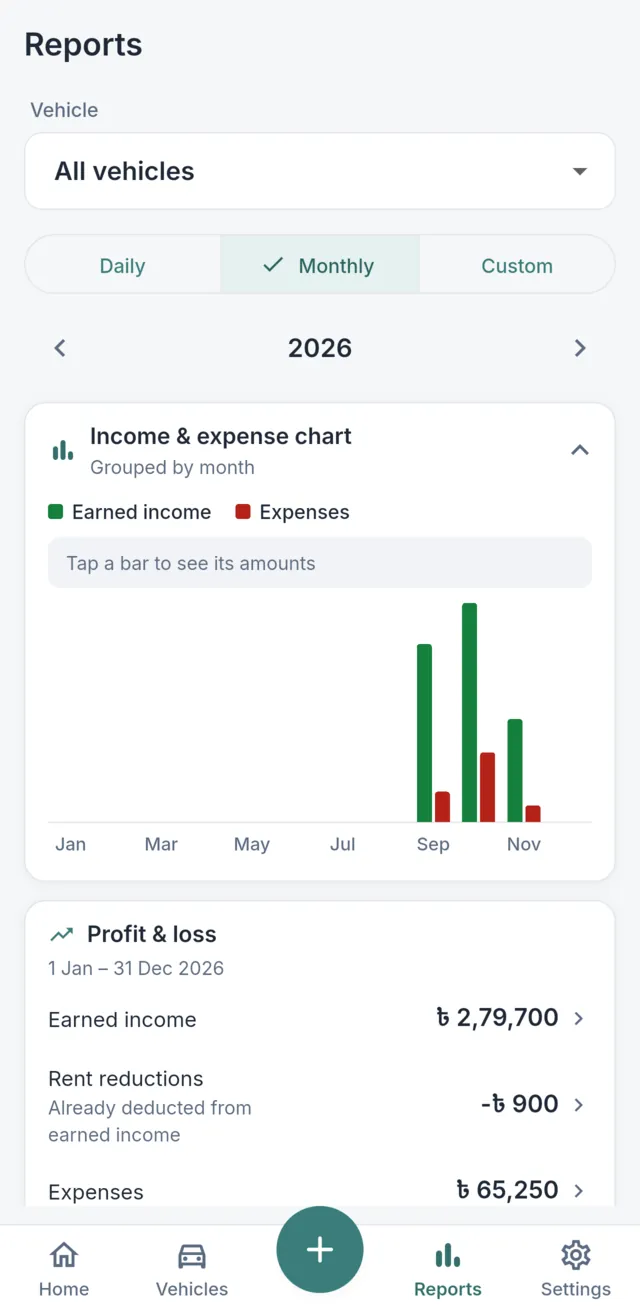
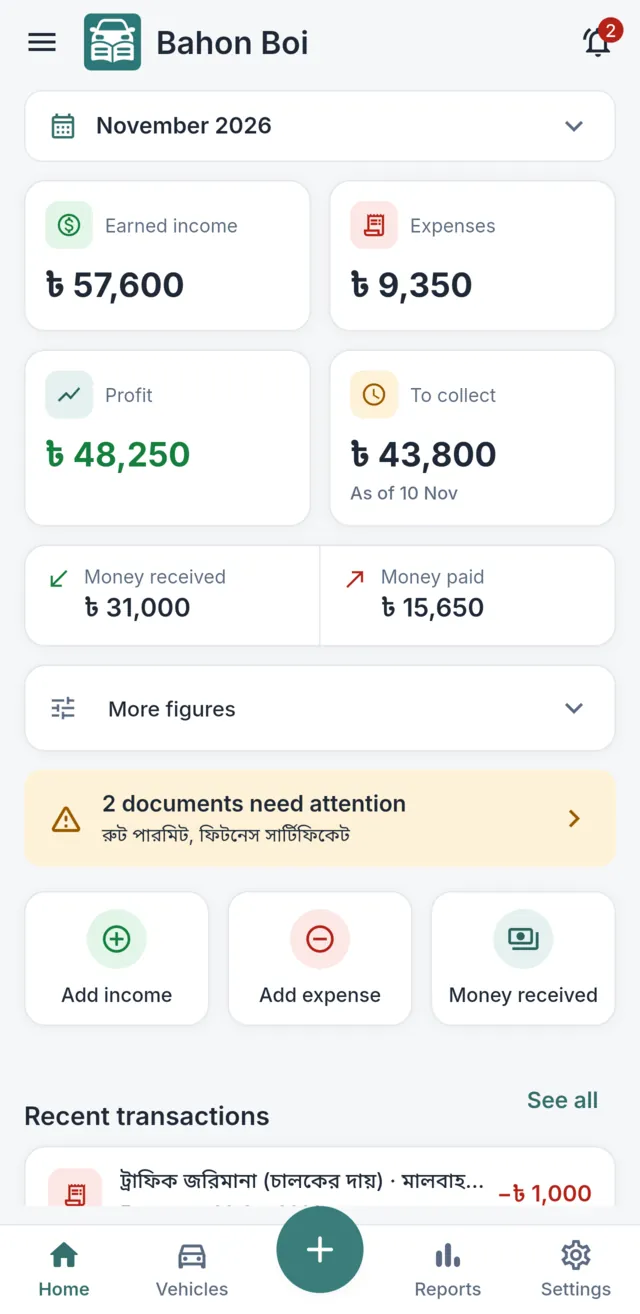
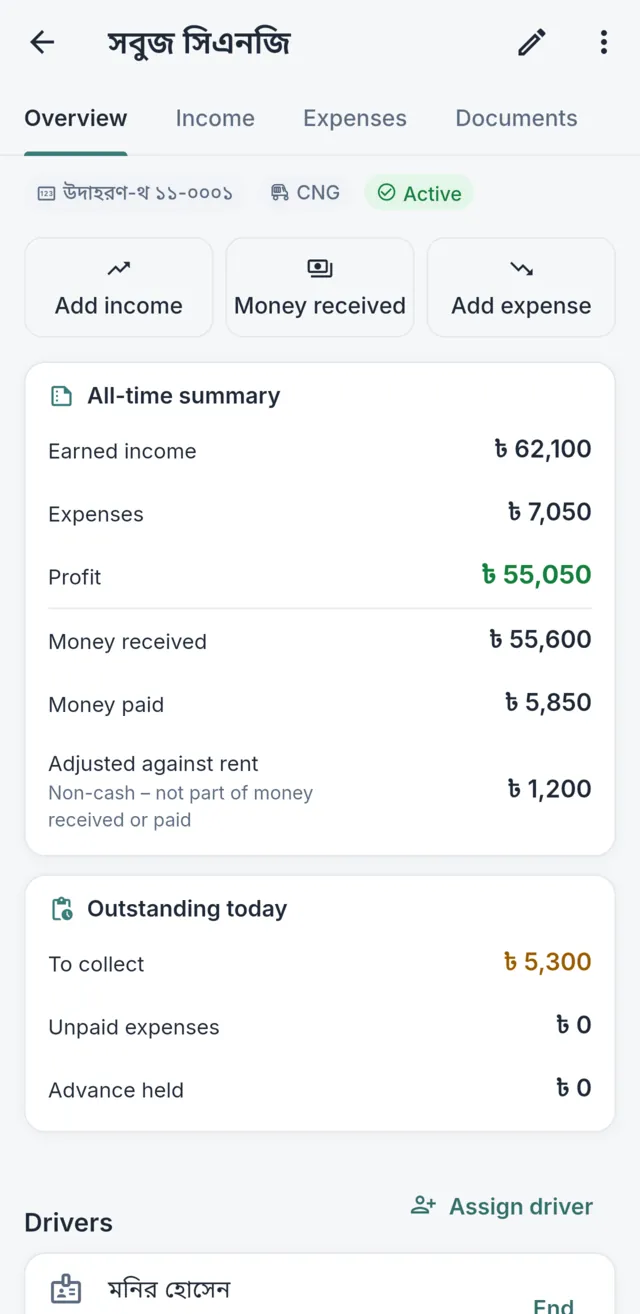
Reports screen with a monthly income and expense chart and a profit and loss summary for the year.Bahon Boi dashboard showing earned income, expenses, profit, money to collect and a document alert for November.Vehicle screen for a CNG with an all-time summary, amounts still due today and the assigned night-shift driver.
Real screenshots from the current app in normal use, filled with fictional example records.

Main benefits

  • Works offline

    Record and check accounts anywhere. No internet is needed for daily use.

  • No account needed

    No sign-up or login. Records stay in the app’s storage on your phone.

  • Earned vs collected, kept apart

    Rent you earned and money you actually received are never mixed up.

  • Bengali and English

    Bengali by default, with Bengali digits. Switch to English any time.

Inside the app

What you see on your phone

  • Bahon Boi dashboard showing earned income, expenses, profit, money to collect and a document alert for November.
    DashboardThe month at a glance: earned income, expenses, profit and what is still to collect.
  • Reports screen with a monthly income and expense chart and a profit and loss summary for the year.
    Monthly reportIncome and expenses by month, with profit and loss for any period.
  • Vehicle screen for a CNG with an all-time summary, amounts still due today and the assigned night-shift driver.
    Vehicle detailsEach vehicle’s own book: earned, received, settled against rent and still due.
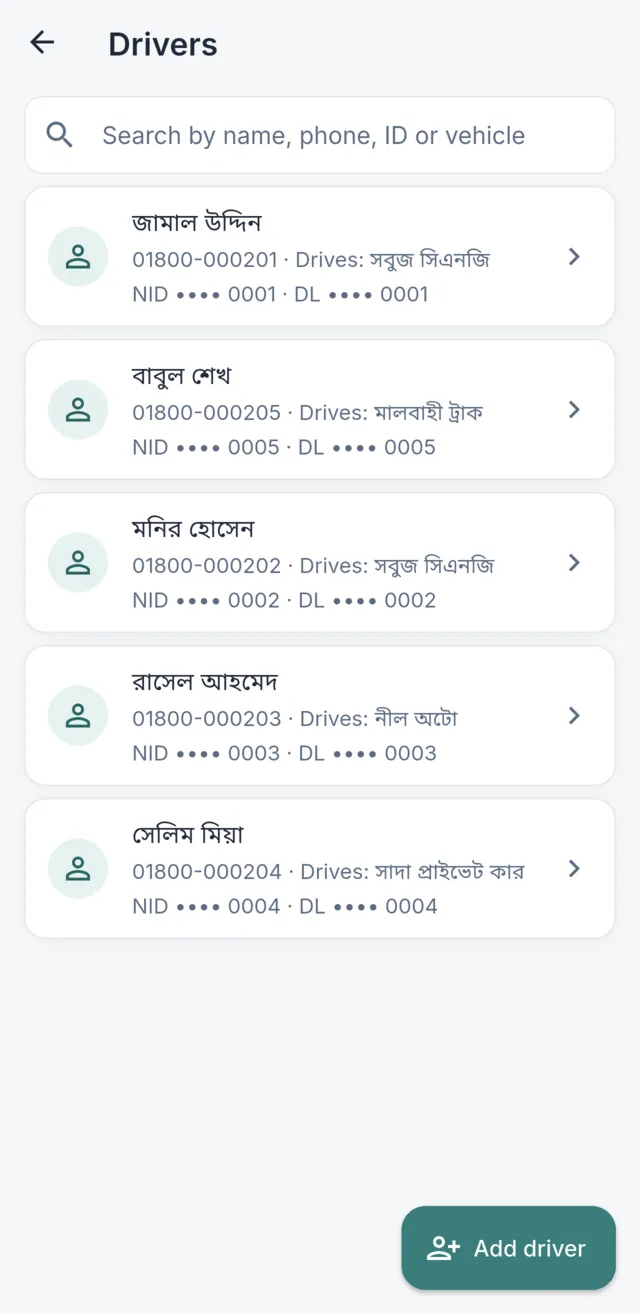
  • Driver list with five drivers, the vehicle each one drives and masked NID and licence numbers.
    DriversEvery driver with phone, vehicle and masked ID numbers.

Real screenshots from the current app in normal use, filled with fictional example records.

For every kind of vehicle

One owner with one CNG or a small fleet — each vehicle keeps its own book, and you can see them all together.

  • Bus
  • Private car
  • CNG
  • Auto-rickshaw
  • Truck
  • Pickup
  • Motorcycle
  • Other (your own type)

Features

Everything here works in the current version

Planned features are listed separately in the guide, under “Not available in this version”.

Vehicles, owners and drivers

Know who owns and who drives each vehicle

Keep each vehicle’s details and photos, its owners and their shares, and a full history of which driver drove it on which shift.

  • Vehicles without a plate yet can be saved by nickname
  • Driver profile, NID and licence numbers, emergency contact and ID photos
  • Several drivers per vehicle: day, night or custom shifts
  • Ending an assignment keeps it in the history
Read the guide
VehiclePlate, type, photos, documents
OwnersContribution → share (record only)
Two drivers on one vehicleExample: Driver A works the day shift from 6:00 to 18:00 and Driver B the night shift from 18:00 to 6:00 the next morning. An earlier driver whose assignment ended stays in the history.6:0012:0018:0024:006:00Driver ADay shiftDriver BNight shiftcrosses midnightEarlier driverAssignment ended — kept in history

Income, money received and dues

Rent earned and money received, kept separate

Record income for a day, week, month or any dates. Record money when it actually reaches you and link it to the income it pays — partial payments and advances included.

  • Daily rent, fixed contract, trip-based and other income
  • Warns before two income entries cover the same day
  • “Fill oldest first” applies money to the oldest dues
  • Extra money waits as an advance, never as income
Read the guide

Expenses and payments

Every cost on the right date, paid or not

Fuel, repairs, servicing, driver salary, documents and other costs. The expense date decides the month’s profit; the payment date decides cash.

  • Paid in full, partly paid or not paid yet — add payments later
  • Invoice photo and shop / vendor
  • Bills entered more than 7 days late are marked “Recorded later”
Read the guide

Who bears this cost?

Owner — counts in your expenses and profit.

Driver — kept for reference only; never lowers rent.

Who paid the shop?

Owner — paid in full, partly, or not yet.

Driver, from own money — pay the driver back, or adjust against rent.

Dashboard and reports

Profit and cash, side by side — never mixed

The Home screen shows a month at a glance. Reports cover any day, month or date range, for one vehicle or all, with an income & expense chart.

  • Earned income, expenses, profit or loss, and money still to collect
  • Balances “as of” any day: dues, unpaid bills, advances, owed to drivers
  • Tap any number to see the entries behind it
Read the guide
Income and expense chart (example)Example bar chart for four months. Earned income: ৳ 28,000, ৳ 30,000, ৳ 26,000, ৳ 31,000; expenses: ৳ 9,000, ৳ 12,500, ৳ 7,000, ৳ 15,000.JanFebMarAprEarned incomeExpensesExample
Example chart drawn for this website.

Documents and reminders

Know which papers are about to expire

Registration, fitness, tax token, route permit, insurance, driving licence and other papers — with dates and photos of each page.

  • Valid, Expiring soon, Expired or No expiry
  • Choose how many days before expiry to be warned
  • Alerts appear inside the app (bell on the Home screen) — no phone notifications
Read the guide
Document expiry statesTimeline: a document is Valid until its warning period starts, Expiring soon during the warning days (30 days if none chosen), and Expired after the expiry date. Alerts appear inside the app only.ValidExpiring soonExpiredWarning starts(your days, or 30)Expiry date

Accounting, explained

Earned, received, due, profit and cash are different numbers

Bahon Boi never adds a driver’s payment as new income, and never works out cash from profit. Here is one week of one vehicle, with example figures.

  1. 1
    Rent earned for the week
    ৳ 7,000
  2. 2
    Driver pays part of it
    Received ৳ 5,000 · due ৳ 2,000

    Income is still ৳ 7,000 — the payment only lowers the due.

  3. 3
    Owner’s repair bill
    ৳ 1,500
  4. =
    Profit = ৳ 7,000 − ৳ 1,500
    ৳ 5,500

Cash, shown separately

Cash movement in two cases
Repair paidRepair not paid yet
Money received৳ 5,000৳ 5,000
Money paid৳ 1,500৳ 0
Net cash movement৳ 3,500৳ 5,000
Unpaid expenses৳ 0৳ 1,500
Profit৳ 5,500৳ 5,500

Profit is the same in both cases; only cash changes.

Earned income
What the vehicle earned for its days — paid or not.
Money received
Cash or transfers that actually reached you. Settles income; never adds to it.
Still to collect
Income − money applied to it.
Expenses
Owner’s costs, on the day the work happened.
Money paid
Payments for expenses, on the day money left your hands.
Profit
Earned income − expenses.
Net cash movement
Money received − money paid. Not a cash balance.
Non-cash adjustments
“Adjust against rent” and rent waivers change dues without moving cash.

Driver paid an owner’s repair

Rent ৳ 7,000. The driver paid a ৳ 1,000 repair from their own money and hands over ৳ 6,000 cash. You record “Adjust against rent” for ৳ 1,000.

  • Profit৳ 6,000
  • Money received৳ 6,000
  • Money paid৳ 0
  • Rent due / owed to driver৳ 0
Read the guide

Part of the rent waived later

Rent ৳ 1,000, the driver paid ৳ 700, and you later agree to waive ৳ 300 with “Reduce / waive rent”.

  • Earned income from the date agreed৳ 700
  • Due৳ 0
  • Cash recorded for the waiver৳ 0
Read the guide

All money rules, with more examples

Backup and restore

Protect your records — set it up on day one

Records live on your phone. Backups go to a folder you choose on the phone, so copying that folder somewhere else is what protects you if the phone is lost.

How backup and restore workFour steps: 1, the app saves backups on the phone; 2, into the BahonBoi Backups folder you chose; 3, you copy that folder off the phone to a computer or USB drive; 4, on a new phone you copy it back and use Restore existing data.1Bahon Boibacks up daily2BahonBoi Backupsfolder you chose3Copy off the phonecomputer or USB4Restoresame or new phone

What the app does

  • After a one-time setup (Android), a data backup about once a day
  • Photos weekly by default, or monthly, or only on demand
  • “Back up now” any time; the newest 30 backups are kept
  • Optional recovery key to encrypt backups

What you should do

  • Check “last backup” in Backup & Restore now and then
  • Recommended routine: copy the “BahonBoi Backups” folder to a computer or USB drive every week
  • Write the recovery key down and keep it away from the phone and the backups

Good to know

  • Normal backups are not encrypted
  • Lose the key and the app installation, and a protected backup cannot be opened
  • Restore replaces the phone’s records; it does not merge
  • Folder backup is not available on iPhone

Step-by-step backup and restore guide

Offline use and privacy

Your accounts stay with you

Everything you record works without internet. There is no account, no advertising and no analytics or crash-reporting service in the current version, and your records are not sent to the developer. When the phone is online, the app only downloads a small public file to check for a newer version.

Being offline does not make a phone risk-free. Records — including drivers’ ID details — are only as safe as your phone and your backup files.

Read the Privacy Policy
  • Works offlineRecording, reports, documents, the guide and backups need no internet.
  • Stored on your phoneIn the app’s private storage; photos are resized copies.
  • Backups where you chooseIf that folder syncs to a cloud service, that service’s terms apply.
  • Your partUse a screen lock, keep backup copies, and keep any recovery key private.

A complete user guide

Eleven illustrated topics with the app’s real button names, numbered steps, worked examples and how to fix mistakes.

Open the guide

FAQ

Common questions

Where can I get the app?

Bahon Boi has not been published in any app store yet. When it is, the download link will appear on this page.

Is money from a driver added as new income?

No. Income is recorded once, as its own entry. When the driver pays, you record money received and link it to that income, so the due goes down. Money received never adds income, and you cannot apply more than an entry’s due — extra money must be kept as an advance.

Are daily rent and trip income recorded the same way?

No. For daily rent you enter a daily rate and the amount fills in as rate × days. For trip-based income you enter the actual amount earned and, optionally, the number of trips. Fixed contracts and other income are separate types too.

Which month does a late bill count in?

An expense counts in profit on the day the work happened; the payment counts in cash on the day you paid. If you enter something with an old date, reports recalculate.

Where are my records kept? Do I need an account?

No account is needed. Records are kept on your phone in the app’s own storage, and the app works without internet. Records are not sent to the developer.

What happens if I lose my phone?

Only what you backed up and copied off the phone can be restored. Set up Backup & Restore on day one, copy the “BahonBoi Backups” folder to a computer or USB drive regularly, and keep any recovery key somewhere else. Without a backup copy, records on a lost phone cannot be recovered.

Do I get a phone notification before a document expires?

Not yet. Expired and expiring documents appear inside the app — on the Home screen’s bell and alert strip and on the vehicle screen.

Can several owners share one vehicle?

Yes, as records: each owner’s contribution and share are kept. Owners do not get separate logins, and the app does not split profit between them.

Can I use Bahon Boi on a computer or online?

No. Bahon Boi is a mobile app. This website only explains it; you cannot keep accounts here.

Coming soon to Google Play

Questions or suggestions? Email hello@munna.dev